
🔄Process engine, workflow engine
Microi code fourth edition workflow engine, supports conditional branching, multi-level approval, parallel approval, V8 events, etc.
📌Preface
First edition:In 2008, the blogger took over the workflow engine developed by his former colleagues based on Microsoft WWF and developed OA systems and ERP systems for more than 10 state-owned enterprises and institutions.
Second Edition:The blogger participated in the secondary development and bug repair of ccflow workflow engine in 2012. He was once the super moderator of ccflow forum and used Microsoft SelverLight technology at that time (unfortunately, he was eliminated). Zhou Zong, the boss of ccflow, is also our predecessor. At present, the open source ccflow workflow engine is still under maintenance. It is strongly recommended to pay attention to it.
Third edition:In 2014, bloggers used Microsoft's latest "WWF" to independently develop "the third edition of workflow engine" and cooperated with AvalonJs UEditor to develop "low-code platform", applying dozens of state-owned enterprises, institutions and units of measurement.
Fourth Edition: Bloggers Use Microi Code' Form Engine' to Drive' Workflow Engine' in 2018. NET core Vue completely self-developed the' 4th generation workflow engine' (since Microsoft WWF does not support. net core, so self-developed)
Advantages of the fourth generation workflow engine
- [Process Attributes] and [Node Attributes] are driven by [Form Engine] for greater flexibility
- Rich front-end V8 events and back-end V8 events to meet complex business requirements, such as calling V8 functions to send
邮件、短信、微信notifications, such as callingFormEngine、ApiEngineImplement complex business logic- [Process Engine] and Business Forms
完全解耦It is convenient to integrate third-party forms and secondary development. Even without a form, [the process engine] can rely on oneFromDataJSON data to run the process- Process Designer Fully Open Source
- Process business management has been applied in hundreds of customers
Preview image
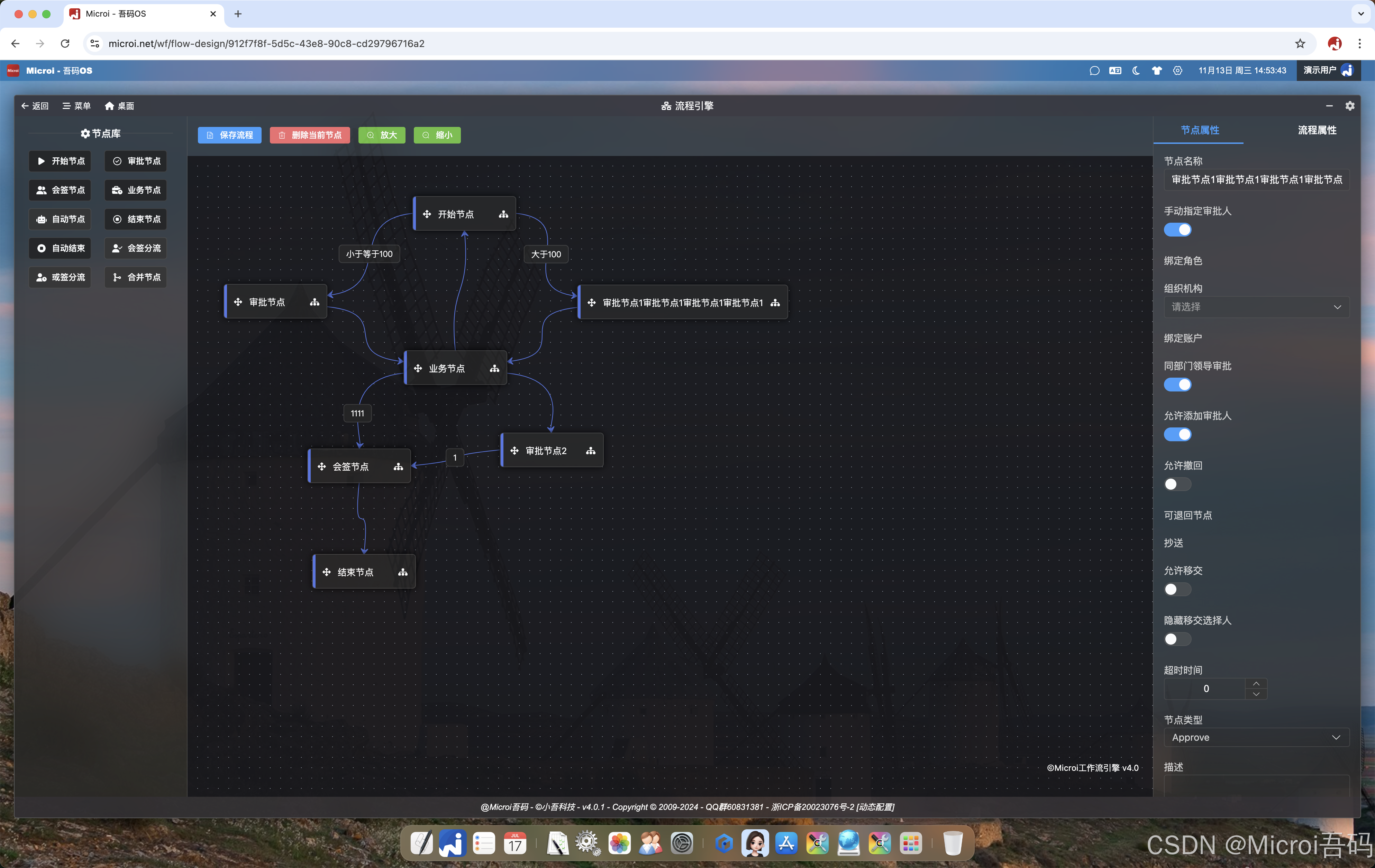
Description of physical tables related to the process engine
- WF_FlowDesign:Flowchart design table, a flowchart corresponds to a piece of data.
- Workflow Node:Process Node Attribute Table
- WF_Line:Process Condition (Line) Attribute Table
- WF_Flow:The process instance table. When a process is initiated, one piece of instance data is generated. One piece of instance data corresponds to N pieces of work data in the WF_Work table.
- WF_Work:The process work to-do table, such as the launch of a process instance, generated 3 to-do, will write 3 WF_Work data.
- WF_History:Process track table, detailing each step of the process and all actions of each person, such as consent, rejection, withdrawal, etc.
V8 Events
V8 Event Order
- User clicks to initiate a process or process a job
- form enters V8 event (front end)
- The user clicks the [Submit] button
- Node Start V8 Event (Front End)
- V8 event before form submission (front end)
- V8 event before form submission (backend)
- V8 event after form submission (backend)
- V8 event after form submission (front end)
- Call the back-end processing work interface.
- Condition judgment V8 (back end)
- Node Start V8 Event (Backend)
- Node End V8 Event (Backend)
- Node End V8 Event (Front End)
All event accessible built-in functions
- V8.WF.ApprovalType:The approval type of the user click, string. Possible values: 'Agree', 'Disagree', 'Recall', 'Auto' (Initiate Process (Start Node)/Business Node/Auto End Node)
- V8.WF.ApprovalIdea:Approval comments filled in by the user, string
- V8.WF.AddUsers:Approvers added by user, array
- V8.WF.SelectUsers:User selected approvers, array
- V8.WF.CurrentFlowDesign:Current process design entity, object type
- V8.WF.CurrentNode:The current node entity, object type
- V8.WF.BackNodeId:If the user clicks Reject and selects which node to return to, this is the node Id
Node start V8 event (front end)
- Can use all front-end V8 functions
if(V8.Form.Money > 1000){
  V8.Tips('金额不能大于1000!', false);//前端提示
  V8.Result= false;//阻止表单和流程提交
  return;
}
//金额加1
V8.Form.Money = V8.Form.Money + 1;
//强制指定下一节点审批人
V8.WF.ForceSelectUsers=['userid'];
//这里可以还执行大部分V8内置函数,如同步接口请求等Node start V8 event (backend)
- Can use all backend V8 functions
- You can use V8.Result = { Code : 0, Msg: 'prevent process commits '}; Rollback transactions, prevent process commits
Conditional Judgment V8 Event (Backend)
- Can use all backend V8 functions
//这里赋值的V8.LineValue,就是[条件属性]设置的[条件值]
if(V8.Form.Money <= 100){
  V8.LineValue = 1;
}else{
  V8.LineValue = 2;
}Node End V8 Event (front end)
- All frontend V8 functions can be used.
- V8.WF.WorkResult:The data returned after the process is successfully executed, such as which node is sent and which approvers are sent.
Node End V8 Event (Backend)
- Can use all backend V8 functions
- V8.WF.NextNode:Accessing the next node entity
- V8.WF.NextTodoUsers:Access Recipient, format:[{Id:'',Name:''}]
Feature Overview
My to-do list
- Get the WF_Work table, pending my work.
Initiated by me
- Get the WF_Flow table, I initiated the process instance.
The one I handled
- Get the WF_Work table that I 've dealt.
- The reason why I do not get the work I process from the WF_Flow table is to realize the field permission control of each node and to realize the recall function.
CC me
- Get the WF_History table, cc gave me the job.
- The reason why I don't get the work that was copied to me from the WF_Flow table is to realize the field permission control of each node.
My related
- Get the WF_Work table, I received the pending work, but not the work handled by me.
All instances
- administrator permission, obtain all process instances (non-work) initiated by the owner in the WF_Flow table
Withdraw
- After node A is submitted to node B and before node B approves, the submittor of node A can voluntarily withdraw it to himself at any time, edit the form data again and submit it again.
- After node B approves, node A cannot withdraw, but node B can withdraw to its own node B before node C approves.
- node a really wants to withdraw again, only node c refuses and returns to node a.
- Note: When withdrawing, the node start V8 and end V8 will also be executed.
- In the future, it is also possible to add submittors to the process attributes, which can be withdrawn at any time.
Related V8
//在前端V8中执行,将某条数据打开Form表单并可以发起流程,第三个object参数若不传,即为查看流程
V8.OpenFormWF(V8.Form, 'Edit', {
	//StartWork:发起流程,ViewWork:查看流程。当为ViewWork时,可以不传FlowDesignId
    WorkType:'StartWork',
    FlowDesignId:'',//流程图Id
});